How to download your family tree file
It takes 2–5 minutes, it’s free on every site, and your tree stays exactly where it is — you only download a copy.
What is a GEDCOM file?
It’s simply your family tree saved as one file — names, dates, places and who is related to whom — in a standard format that every family-tree website and program understands. Think of it as a copy of your tree that you download and send to us, like a document. Nothing in your tree is changed or deleted.
- The file name ends in .ged. Sometimes it arrives packed in a .zip — that’s fine, upload the .zip as it is.
- It contains names, dates and relationships. No photos — and we don’t need them for the check.
- It usually lands in your Downloads folder, or arrives as a link by email (MyHeritage, Geni).
- Phone apps can’t export trees. Use the website on a computer — or on a tablet in the browser.
Download from MyHeritage
The most common home for family trees in Israel and among Russian-speaking families.
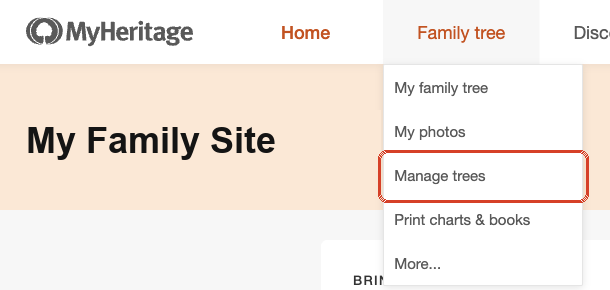
- Open the Family tree menu and choose “Manage trees”
Sign in on the MyHeritage website. Point at Family tree in the top menu.
- Click “Export to GEDCOM” next to your tree
It’s in the Actions column on the right.

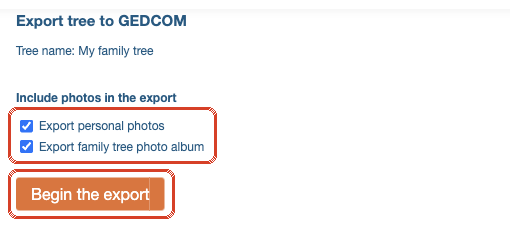
- Untick the two photo boxes and click “Begin the export”
Without photos the file is small and arrives faster. We don’t need photos for the check.
- Wait for the email from MyHeritage
Usually a few minutes, longer for big trees. Click the link in the email — the file goes to your Downloads folder. Check the spam folder if it doesn’t arrive.
- Upload the file on our page
Drag it from Downloads into the box on the check page.
Download from Ancestry
No subscription needed. Only the tree’s owner can export it.
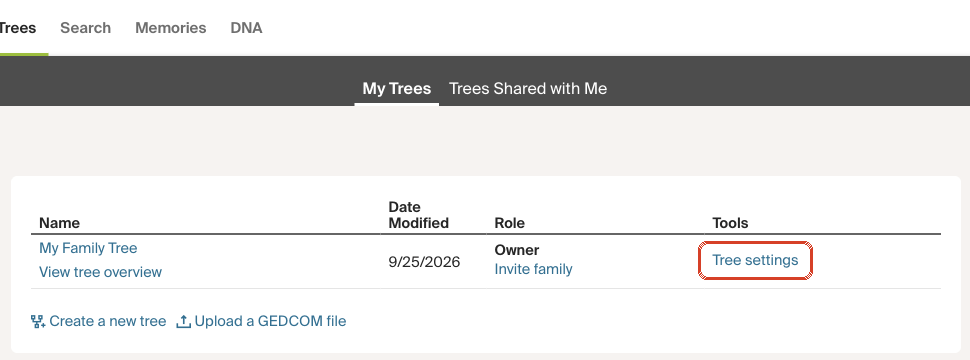
- Go to Trees and click “Tree settings”
Sign in on the Ancestry website, open Trees. Your trees are listed; click Tree settings next to the one you want.
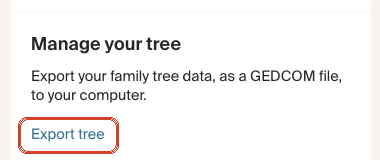
- Under “Manage your tree”, click “Export tree”
It’s on the right side of the Tree Info page.
- Click “Export”
Ancestry prepares the file — a minute or two — then offers to download it.
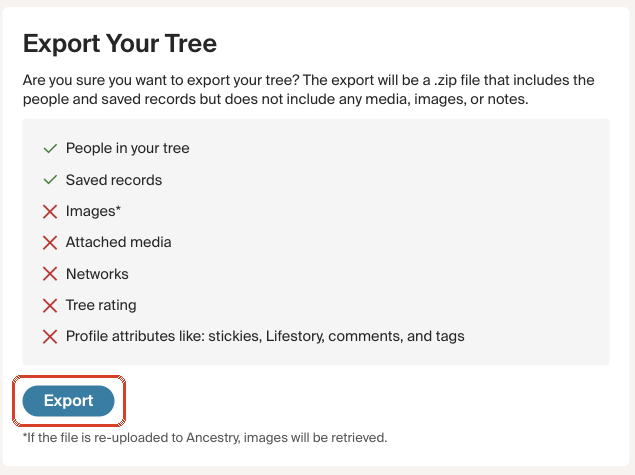
- Upload the .zip on our page
The file lands in Downloads, named after your tree. No need to unzip — we read it as it is.
Download from Geni
Geni is one big shared tree, so it lets you export only part of it.
- Open the GEDCOM export page
Sign in on the Geni website. In the Family menu choose Share Your Tree, then Export. To start from another relative, open their profile and choose Actions → Export GEDCOM.
- Choose “Blood relatives”
Leave the other settings as they are and click Export to GEDCOM at the bottom.
- Wait for the email from Geni
It contains a download link. Check spam if it doesn’t come within an hour.
Your tree is on FamilySearch
FamilySearch has one shared tree for everyone, and since September 2026 it no longer offers a direct download.
- Easiest: send us the FamilySearch ID of your earliest known ancestor
Every person in the FamilySearch tree has an ID like KWXX-XXX, shown on their page under the name. Paste it into the form at the bottom of this page. Deceased people in the shared tree are visible to everyone, so that’s all we need.
- Or export through a family tree program
Programs certified by FamilySearch — RootsMagic, Ancestral Quest, Legacy; each has a free version — can sign in to FamilySearch, bring your ancestors in, and save a GEDCOM: File → Export → GEDCOM.
Your tree is in a family tree program
Every program can save a GEDCOM. Look for “Export” in the File menu and save the file somewhere you’ll find it, like the Desktop.
| Program | Where to click |
|---|---|
| Family Tree Builder | File → Export GEDCOM → Save as. Photos are optional — skip them. |
| Family Tree Maker | File → Export → Entire file → Output format: GEDCOM → Save. |
| RootsMagic | File → Export Data → GEDCOM File → Entire database → Save. |
| Legacy Family Tree | File → Export To → GEDCOM File → Start export. |
| MacFamilyTree / MobileFamilyTree | Export → GEDCOM. Choose version 5.5.1 if asked. Works on iPhone and iPad too. |
| Gramps | Family Trees → Export… → GEDCOM → Apply. |
| Древо Жизни (Genery) | Export to GEDCOM. Clear any filters in the people list first — only visible people are exported. |
Your tree is on paper, in a document, or in someone’s memory
That’s how most family histories live. Tell us what you have — a drawn chart, a Word or Excel list, a profile link on Geni or FamilySearch, or just what grandma told you — and we’ll get back to you with how to start.